自定义hook-useQuery简单实现
背景:在写react项目过程中,难免要进行数据的处理,父子组件,兄弟组件传数据没什么说的,跨层,跨多层传数据是很让我头大的事情,开始用redux,可是代码量大,逻辑复杂容易出错,想到,可以用url进行数据的传递,同一个页面下的组件,都可以用window.location获取url,把数据传递给url,然后需要用数据的组件从url获取就好了啊,说干就干。
前期准备
写一个简单的form表单,因为经常在表单查询数据,页面刷新数据回填的情况使用
1
2
3
4
5
6
7
8
9
10
11
12
13
| <div>
<Form form={form} onFinish={onFinish}>
<Form.Item label='name' name='name'>
<Input style={{ width: 200 }} />
</Form.Item>
<Form.Item label='age' name='age'>
<Input style={{ width: 200 }} />
</Form.Item>
<Form.Item>
<Button type='primary' htmlType="submit">提交</Button>
</Form.Item>
</Form>
</div>
|
使用useQuery肯定要这样用,const [query, setQuery] = useQuery();,query是所有参数的对象格式,setQuery是一个方法,需要传递一个参数对象进去来改变url,所以整体外部结构就确定了
1
2
3
4
5
6
7
8
9
10
11
12
13
14
15
16
17
18
19
20
21
22
23
24
25
26
27
28
29
30
31
32
33
34
35
36
| import React, { useEffect } from 'react'
import { Button, Form, Input } from 'antd'
import { useQuery } from './useQuery'
function Index() {
const [form] = Form.useForm();
const [query, setQuery] = useQuery();
const onFinish = () => {
const { name, age } = form.getFieldsValue(['name', 'age'])
setQuery({ name, age })
}
useEffect(() => {
const { name, age } = query
form.setFieldsValue({
name,
age,
})
}, [form, query])
return (
<div>
    <Form form={form} onFinish={onFinish}>
        <Form.Item label='name' name='name'>
            <Input style={{ width: 200 }} />
        </Form.Item>
        <Form.Item label='age' name='age'>
            <Input style={{ width: 200 }} />
        </Form.Item>
        <Form.Item>
            <Button type='primary' htmlType="submit">提交</Button>
        </Form.Item>
    </Form>
</div>
)
}
export default Index
|
封装hook
window.location是可以得到当前url的很多信息的,如:
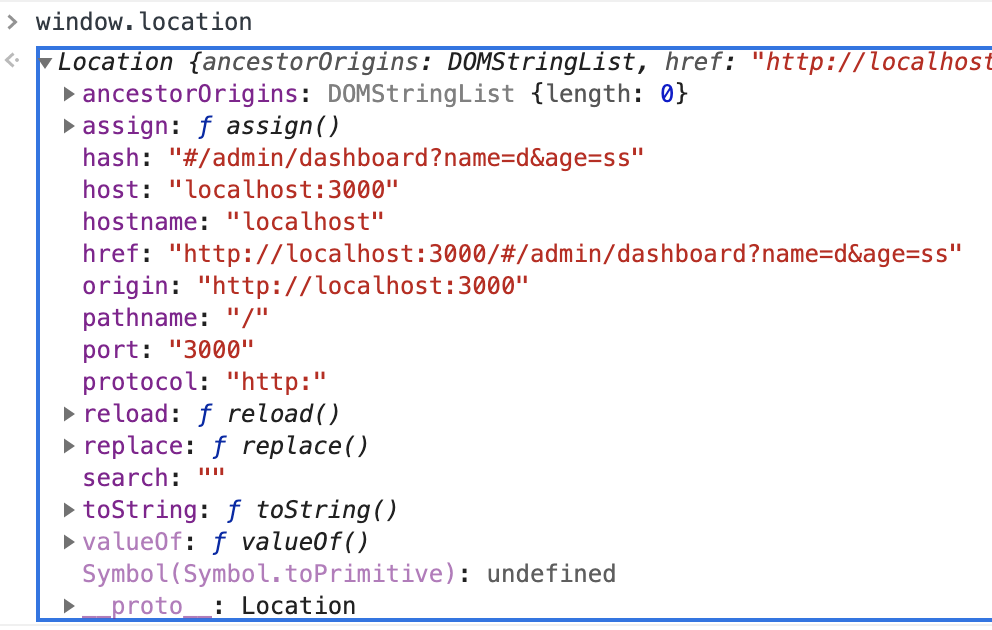
那query只需要对url进行格式化处理就能得到了,取到?后面的参数字符串,然后用split方法分割成一个个参数,最后把a=b形式的数据变成{a: b}即可。
而setQuery需要对传入的参数对象进行处理,与上面相反,需要把对象转化成字符串,然后重新生成新的query就好了,代码如下:
1
2
3
4
5
6
7
8
9
10
11
12
13
14
15
16
17
18
19
20
21
22
23
24
25
26
27
28
29
30
31
32
33
34
35
36
37
38
39
40
41
42
43
| import { useState, useEffect } from 'react'
export function useQuery() {
const [query, setQueryObject] = useState('');
const mapParamsToQuery = () => {
const queryObject = {}
const paramsString = window.location.href.indexOf('?') === -1 ? '' : window.location.href.slice(window.location.href.indexOf('?') + 1)
const paramsList = paramsString.split('&')
paramsList.forEach((item) => {
const key = item.slice(0, item.indexOf('='))
const value = item.slice(item.indexOf('=') + 1)
const query = {
[key]: value
}
Object.assign(queryObject, query)
})
setQueryObject(queryObject)
}
useEffect(() => {
mapParamsToQuery()
}, [])
const format = (obj) => {
let str = '?'
for (let i in obj) {
if (obj.hasOwnProperty(i)) {
str = `${str}${i}=${obj[i]}&`
}
}
return str
}
const setQuery = (obj) => {
window.location.href = window.location.href.indexOf('?') === -1 ?
window.location.href + format(obj) :
window.location.href.slice(0, window.location.href.indexOf('?')) + format(obj);
window.location.href = window.location.href.slice(0, window.location.href.length - 1)
mapParamsToQuery()
}
return [query, setQuery]
}
|
注意自定义hook要写成usexxx才行,否则会报错,因为hook规则hook只能写在顶层。
但是这里存在着很大的问题,变淡数据不能是中文,否则回填会出现乱码,暂时还没有解决。
该项目github地址